
Google PageSpeed
optimizing WordPress and Jetpack
technique · Article · jeudi, 24 septembre 2015 à 15:28:02 · 13 min
Here is a second technical article using this blog as its case study. In the previous post, I talked about the state of my WordPress theme and mentioned that optimizing its performance was particularly difficult because of certain plugins. This post goes into more detail on that subject: how do you check a website's performance? How do you optimize it? How far should you take the pursuit of optimization?
This post does not claim to be exhaustive, far from it, given how vast the subject is. It merely serves as an introduction for those who are interested. As a prerequisite, make sure you understand the "client-server" paradigm, which underpins the overwhelming majority of exchanges on the Internet.
Website performance?
When people talk about the technical performance of a website, it generally boils down to one fairly simple thing: how long its pages take to load. In other words, the time needed to display the content of the page requested by your browser. This measurement is a kind of Holy Grail, with the advantage of bundling together a multitude of factors, of which here is a short list:
||Nowadays, big companies no longer bet on "one big server" to maximize their performance; they prefer to rely on a multitude of cheap computers. There are several reasons for this, including the fact that computer failures are no longer considered "errors" but as an inevitability that must be accounted for. Another reason lies in the progress of parallel programming, which studies how to optimize the distribution of tasks within a group of computers: three small servers working in good harmony are better than one.
- Server processing speed: the server(s) processing the requested page can be more or less efficient. CPU power, bandwidth speed, storage space, RAM, server type — all of these parameters come into play when it comes to returning web pages to a client. If, like me, you run a blog on shared hosting, you will generally not get to choose your weapons in this domain. Your hosting provider is the one responsible, so your only room for maneuver is to pick one carefully.
- The language used: when you request a web page, it reaches you in the form of HTML data. Today, most websites do not simply serve you "flat" HTML: between your request and the reception of the HTML code, the server performs various steps to generate the content dynamically. These operations can be handled by different languages, and some are faster than others. A first distinction is usually drawn between interpreted languages and compiled languages (also called "machine code"). This is one of the pillars of programming, web and traditional alike: for your computer to be able to understand a piece of code, it must be "translated" into a "language" it can understand. Machine languages require developers to compile (translate) the human code into machine code before using it. It is a tedious step that makes development rather inflexible, but it guarantees better performance. Conversely, interpreted languages compile the code on the fly when it is requested, which spares developers a step but implies lower performance. PHP (just like Java or Ruby) is one of the interpreted languages (although it can be compiled), hence lower performance compared to C++ and the like. Among interpreted languages, PHP even stands out as the dunce of the class for its slowness and its lack of consistency. And yet, it remains the uncontested master of the web with an 80% market share. That is doubtless what explains its presence by default at most hosting providers. Just our luck: WordPress is PHP. With such a track record, our blog's life is off to a bad start...
- Resource size and dispersion: here we are, finally a subject on which we have some influence! When a web page is requested, it generally calls upon a multitude of "external" resources that must be loaded along with it. These resources can be images, stylesheets (which dictate how the page content looks), Javascript code (which brings the page to life) or more specific data. The size of these resources therefore plays a crucial role in page load times. It is thus important to minimize the number of external resources, but also to limit their weight and to make sure they are actually available (latency reduces the speed at which pages load).
Measuring your website's performance
There is a multitude of tools available to measure your website's performance. In the case of this blog, I use two:
: this tool works similarly to Google PageSpeed Insights. You enter a website's address and it returns the validity of its HTML code. We are not directly discussing performance here, but rather the integrity of the HTML code that makes up the page. This measurement can nevertheless influence performance if certain tags are malformed and require more processing time from your browser.
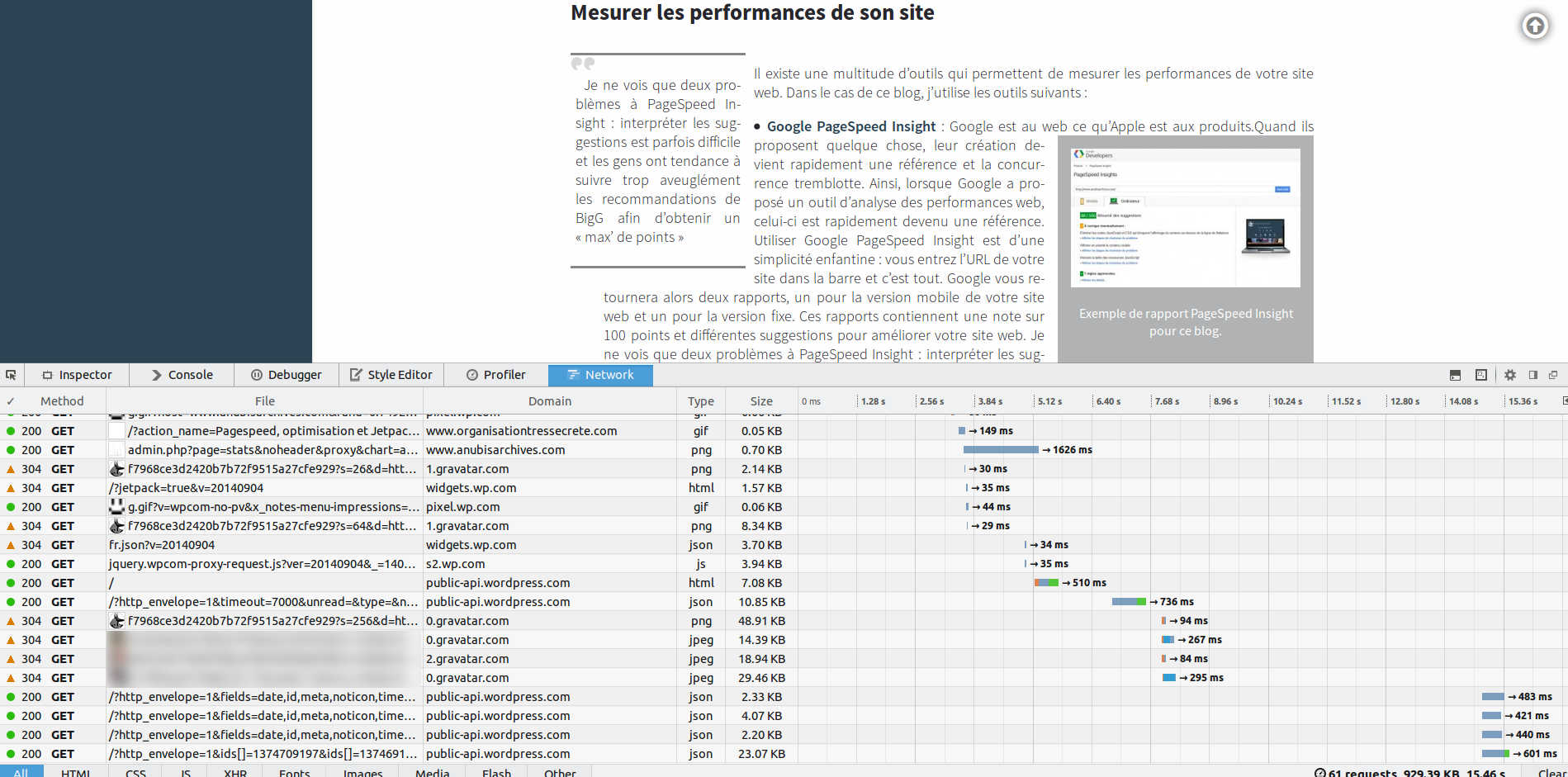
Example with Firefox 32: a ton of external resources are needed to load a single page of this blog.
- Google PageSpeed Insights: Google is to the web what Apple is to products. Wherever they show up, they become the benchmark and the competition trembles. Naturally, when Google offered a web performance analysis tool, it quickly became a must. Using Google PageSpeed Insights is child's play: you type your site's URL into the bar and that's it. Google will then return two reports, one for the mobile version of your website and one for the desktop version. These reports contain a score out of 100 points and various suggestions for improving your website. I only see two problems with PageSpeed Insights: interpreting the suggestions is sometimes difficult, and people tend to follow BigG's recommendations far too blindly in order to get the "max points" (it's like a game). This approach suffers from a few limitations, one of which will be explained further down.
- Your browser's analysis tools: no link this time, because you already own this little gem. Your browser offers powerful analysis tools (yes, even if you use Internet Explorer) provided you keep it up to date. To access these tools, you generally just need to right-click on the page and choose "inspect element". This will bring up a new window (usually docked to the main one) with different tabs: one to analyze the source code of the page, one to look at each imported resource, and one displaying the page's loading timeline. It is this last tab that interests us, since it clearly shows you which resources are slowest to load, on top of giving you a tally of the page's total weight and of the time needed to generate it.
Verdict: WordPress would have been better named GasPress
You know what can influence a website's performance, and you know how to analyze a website. Great. If you run a WordPress blog, you have probably already given it a try while reading this post. And you probably came out of it horrified, especially if you use a whole heapful of plugins, JetPack included.
In developer circles, it is common knowledge that WordPress is a "gas factory" that consumes an excessive amount of resources. Plugins and themes, so convenient for customizing your blog, are rarely judged on their performance. That is how you end up with identical files being called several times, remote resources loaded ad nauseam, and other unexpected treats.
What can you do if you want to offer your users a halfway decent experience? Having tried it, building a theme achieves nothing. At best, you will save a few external resources by directly integrating features you used to get from plugins, but the gains will remain marginal. So you have to apply the "WordPress method": to clean up the waste generated by one gas factory, nothing beats calling upon another gas factory dedicated to cleaning. Various WordPress plugins will help you minimize this whole mess.
Here again, every blogger has their own combination. Having wrung out my fair share of possibilities, here is my winning trio:
- Autoptimize: this plugin focuses on the code of your pages. Javascript, CSS and HTML can all three be minified (removing unneeded spaces, merging similar content, ...) so as to save space, therefore bytes, therefore loading time. Autoptimize is particularly effective at this task while remaining configurable enough to leave you in control of your blog. It impresses me most on the CSS side: you have the option to display all the content directly on the page (which spares the loading of external resources) or to load the CSS files in a deferred manner. The author, Futta, even provides you with very clear information about the impact these choices will have on your website. Among other things, he puts the PageSpeed Insights score into perspective: Google encourages you either to embed the CSS code directly into your HTML page to reduce the number of external resources to load, or to defer the loading of "secondary" CSS resources to make the loading of the essential content faster. These suggestions have side effects. In the first case, the CSS content will no longer be cached and will therefore have to be reloaded for every page opened. In the second, it is particularly difficult to select a limited number of "essential" CSS features, and you risk serving your visitors a badly formatted page until all the resources have loaded.
- EWWW Image Optimizer: the image question is a thorny one, and it cannot be settled with a simple plugin. First and foremost, it is about making good use of the various image sizes WordPress creates at upload time, so as not to display large photos or illustrations when it is not necessary. Once you have limited the images in your articles to a reasonable size, all that remains is to find a way to compress them. This compression can be done when saving your files in your favorite editing program (Gimp, Photoshop, ...), but if, like me, you already had a large number of images on your blog, a made-in-WordPress solution is more advisable. In that respect, EWWW Image Optimizer arrived like the Messiah. It uses jpegtran for JPEGs, optipng or pngout for PNGs, gifsicle for GIFs, and even offers to convert your images to WebP and serve them only to compatible browsers. It is incredibly classy, all the more so as you can launch a well-placed "bulk optimize" (albeit a bit heavy on the server side) to compress all previously uploaded images.
- WP Super Cache: with the two plugins above, we managed to reduce the number of scripts and CSS files and to optimize the images. It is nevertheless possible to "flatten" all this data even further into raw HTML, refreshed when necessary. This is what is called "a cache", and WordPress is brimming with plugins capable of handling it for you. I chose WP Super Cache for its fast algorithm, its numerous (almost too many) options and its overall efficiency. It is not all rosy: pre-caching, which consists of putting pages into the cache before visitors view them, is too touchy and generally proves useless. Apart from that, it is still a speed gain when loading pages.
To all of this, you can add
which lets you edit the virtual htaccess file of your WordPress blog. An opportunity to add instructions for the browser cache and to enable Gzip compression, which further reduces the weight of transferred data. Note that this plugin can overlap with Autoptimize.
|| With all the ill I speak of JetPack, it would seem logical to remove it from the blog. All the more so when you think of the privacy problems JetPack raises, Automattic being an American company subject to the laws of its own country.
One thing must be understood: since 2006, the web has made incredible progress in terms of usability and possibilities. This progress has been driven by centralized applications (like Facebook or Twitter) that threaten the diversity of the web. For many people, "The Internet" rhymes with "Facebook" (a poor sense of rhyme, I concede). Projects like JetPack carry hope, because they preserve the connectivity brought by social networks while guaranteeing a decentralization close to what we knew in the first half of the 2000s. But even this fine initial promise looks glum when faced with all the constraints and risks implied by JetPack's current implementation...
All these efforts have raised my PageSpeed Insights rank to 88 for the Desktop version and 79 for the mobile version, more than an honorable score. But why not 100?

The proof — lookee, it's the proof!!
Among the suggestions made by Google to optimize my blog, there is "Prioritize visible content", which would ask me either to embed the CSS directly into the HTML, or to defer the loading of external CSS resources. Neither of these options seems viable to me for the reasons laid out above, and I will settle for passing my turn.
There are also two other points that are genuine problems: the sheer number of resources to load, and their weight. One quick glance is enough to immediately understand who the culprit is: it is JetPack, the famous plugin from Automattic that opens unprecedented connectivity to WordPress blogs. This plugin imposes a sheer number of CSS and JavaScript files, sometimes loaded from unfriendly remote servers. It also prevents efficiently merging the JS files (on pain of losing certain features, like WordPress "likes"). Along the same lines, its Carousel (gallery image display) makes the blog's HTML validation fail, and the image mosaics serve far too large (and therefore heavy) versions of the thumbnails. It is unfortunate to see such features so poorly optimized, all the more so as WordPress is becoming increasingly dependent on them.
As it turns out, the teams in charge of JetPack are in the middle of an analysis phase and are looking to optimize both the features and the performance of their mega-plugin. Since WordPress 4 should be released very soon, I hope the developers will take the opportunity to lay out their Jetpack optimization plan in the coming days. Failing that, I may end up removing it despite the innovative features it offers: the Archives will be fast, or they will not be!