
Modern hotlinking
a danger to anonymity
technique · Article · jeudi, 25 février 2016 à 12:45:46 · 10 min
Yesterday evening, I imported the logs of NginX and Apache into Piwik. If you do not understand what that means, so much the better, this article will be useful to you. Be that as it may, the result of this import involuntarily put me in the position of an NSA agent: before my eyes was almost the complete traffic, page by page, of nearly 8,000 visits on sites that had nothing to do with ours. One single reason for that: "hotlinking".
This article aims to present a very concrete use of this confidentiality breach, one so easily opened by millions of webmasters around the world.
Hotlinking
Known since the dawn of the Internet, "hotlinking" is an almost obsolete term designating the use of resources (images, videos, scripts, ...) hosted on a server having nothing to do with the website using them. This practice was initially discouraged, because it consumed the bandwidth of the server thus plundered, via another site that could profit from its content without burning its own data plan. One must remember that ten years ago, bandwidth was one of the main bottlenecks for "small" websites: hosts offered something like 30 GB of monthly traffic. If you had the bad idea of publishing a 150 KB image on your website and a popular site used it at your expense, it would only have taken 200,000 visits over a month to swallow the entirety of your 30 GB allowance. The solution to this problem was to block, at the server level, accesses coming from "non-accredited" referrers.

Nowadays, two things have changed: bandwidth has grown more generous, and the big companies, in their attempt to centralize the Internet, are more than happy to offer you services hosted on their end, which you merely need to integrate into your websites. In this case, we talk about "CDNs"((Content Delivery Networks, servers optimized for speed, whose sole purpose is to duplicate your site's resources and serve them faster to your visitors)), "Widgets"((Small pieces of an external site, often generated by javascript that will download additional resources from the sites of the company providing the widgets.)) or even "Webservices". Hard to rise up against these practices: in themselves, they are the foundations of the "Web 2.0", of interoperability between websites and of the standardization of communications on the Internet. It is thanks to them that we have come so far - for better and for worse. One must however keep in mind the implications of using these external resources and, above all, how much they can betray your confidentiality.
Back to the basics
The rest of this article will go into technical details. If you are not versed in these matters, hold on tight: the learning is worth it.
Advertising trackers
If you follow technology news, you are no doubt aware of the many debates shaking the web regarding privacy. For the past few years (everything accelerated after Edward Snowden's revelations), various groups of savvy users, conscientious advertisers or companies have opposed the multiplication of cookies, which can be used to discreetly track people on the Internet. These cookies are installed by Javascript, a language executed by your browser. Nowadays, it is possible to extend our browsers' features with plug-ins like Ghostery, uBlock or Disconnect: these disable the most common trackers, detected via regularly updated lists, much like the viral databases used by antivirus programs. And believe me, eradicating all the unhealthy trackers that proliferate on many a site yields an absolutely dramatic gain in performance and bandwidth, in addition to protecting your privacy from (advertising or governmental) agencies that definitively do not wish you well.
Clubic, one of the dirtiest sites on the Internet: between 150 and 400 resources loaded on each page, for 5 to 10MB, including some thirty trackers spotted by Ghostery. Display time? More than thirty seconds, in some cases.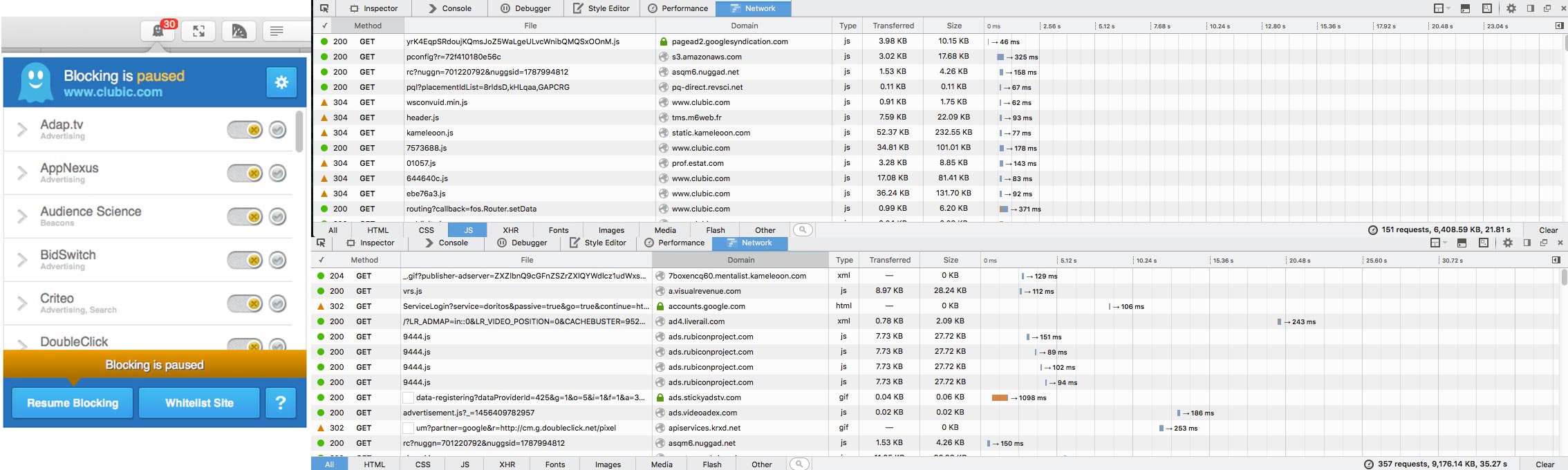
If "going to a site" were the equivalent of "making love to someone", then these script-blocking plugins are the condoms that will prevent your browser - and your anonymity on the Internet - from croaking from a venereal disease. Use them. In a way, it is sad to have to block "trackers" like Piwik (used on this blog), whose data generally only serves to measure a site's audience and optimize its ergonomics. But choosing between limiting a site like mine's statistics and letting the entirety of the web's users rot, the first solution stands as the lesser evil.
Server logs vs Page tagging
The tracking techniques mentioned above almost all use the same method: javascript code, interpreted by your browser, sends sometimes rather sophisticated data to a remote server, which processes it for multiple purposes (from simple statistics for webmasters to dirty, unhealthy profiling for advertisers). In the "Web Analytics" world, this technique is called "Page Tagging". If you block javascript - or at least, certain codes specific to these trackers - the scripts become inoperative.
That said, do not think you are safe. There exists another threat almost as dangerous for your privacy: server logs, which can also serve as the basis for an analysis of your traffic.
An example of an HTTP header, sent by Safari when visiting my blog. The server receives all this information, including the page I am on during the HTTP request [the "Referer" field]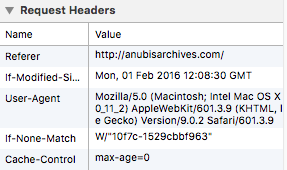
Let us start from the beginning. HTTP (HyperText Transfer Protocol) is the reference protocol used on the Internet. Like their real-life equivalents, computer protocols are a series of rules for computers to follow, in order to exchange information. HTTP is designed for a client (your browser) and a server (a remote computer): the client introduces itself through a series of discreet headers, the server assents and returns the resources requested by the client. And so, modern servers (among others, Apache and NginX) record every request made by their clients. By default, these records contain:
- the client's IP address
- the user (rarely applicable)
- the date and time of the request
- the requested resource
- the codes associated with the request
- the referrer ("Referer" field of the header)
- the browser information ("User-Agent" field of the header).
In short, here is the result of a single request:
51.255.65.39 - - [25/Feb/2016:09:23:17 +0100] "GET /jdr/masquesanubis/doku.php?id=pnj:neris&ns=place&tab_files=files&do=media&tab_details=history&image=doc%3Aallutigre.png HTTP/1.1" 200 4841 "-" "Mozilla/5.0 (compatible; AhrefsBot/5.0; +http://ahrefs.com/robot/)"
There exist software programs, like Piwik or AwStats, that allow importing and analyzing these logs. They extract website usage statistics from them. Out of curiosity, I slurped the roughly 150,000 lines composing our server's last log file into Piwik. And there, I found myself with the traffic of thousands of anonymous people, on unknown sites over which I have absolutely no control. Yes, it is that terrible!
What happened
It turns out that Ddril, my partner and co-owner of the Organisation Très Secrète, is particularly invested in the forum role-playing community. This community heavily relies on cross-references: link directories, partnerships and word of mouth are among the best methods to attract RPG players to a new forum. These "alliances" usually take the shape of a logo or a banner, located somewhere on the page and leading to the partner forum.
It also turns out that far too many webmasters merely "hotlink" the logos, rather than hosting them directly on their own server. If you have followed this article, you know what results from it: each page opened by a visitor on which the hotlinked logo appears generates an HTTP request to the server hosting the image. This request is recorded, with all the information tied to it, including the exact address of the page the visitor is on. After the fact, one can therefore reconstruct said visitor's path with precision, correlated with their IP address (which allows locating the person with more or less precision). In short: without needing any Javascript, it is possible to track pretty much anyone with decent precision. And we are talking here about nearly 8,000 visits... over two days.
How to protect yourself
Let us be clear: server logs are precious tools for understanding potential failures. Do not expect sysadmins to reduce the precision of these logs just for your beautiful eyes. It would be conceivable to only record the information of strangely behaving visitors (far too many requests in a short time, for example), but by the time every server in the world is updated to adopt such behavior, we will all have gray hair.
A webmaster at work
The responsibility for this breach in the privacy of thousands of people falls exclusively on the unconscious webmasters who use external resources ad nauseam, sparing themselves any reflection on the consequences of this behavior. As a baseline, avoid their sites like the plague.
Failing that, a few methods exist to protect yourself: on Firefox, for example, it is possible to block the "Referer" field of your HTTP headers. You will thus prevent the logs from recording your URL and tracking you from page to page. Unfortunately, this behavior sometimes crashes the sites that use this field (to prevent deep linking, for example). The ideal would be to withdraw your real data and replace it with fake information: I have not dug around the web enough on this subject, but it must already exist. You can also use browser plugins, which offer the possibility to block resources loaded from third-party sites: here again, you risk missing content useful for the page's display, but you will be able to validate them manually if necessary. At least you will be informed.
Conclusions
As for the data absorbed by Piwik, I deleted it: beyond the obvious ethical reasons, the roughly 8,000 records over two days equaled, in terms of size, almost two years of traffic on my blog. A lot of space wasted for nothing.
If you own a website and care even a little about your visitors' anonymity, activate your browser's analysis tools and go over all your pages. For each resource loaded outside your site, ask yourself whether it is really necessary and above all, whether its host is trustworthy. You are exposing all your visitors to risks.
A word to the wise!